Tecno mobile users eagerly wait every year for new system updates because each major update brings better performance, new features, improved security, and smoother daily usage. Recently, many Tecno users are searching online for information about the HiOS 16 update. Users want to know what new features HiOS 16 will bring, which Tecno phones will receive the update, and how to update their device safely.
In this article, I will explain everything about the HiOS 16 update for Tecno mobiles in very easy words. You will learn about the expected launch time, new features, supported Tecno phones, and step-by-step update process. If you are a Tecno user, this guide will help you understand whether your phone is ready for the next big update or not.
Table of Contents
HiOS 16 New Features in Details
Tecno usually releases features based on phone hardware, Android version, and region. Below are the expected and commonly improved features in HiOS 16, explained in simple language.
Important Note: Tecno may add more features with Android 16 and HiOS 16. This article will be updated regularly as new information comes.
1. Improved User Interface (UI)
HiOS 16 is expected to bring a cleaner and more modern UI. Icons, system animations, transitions, and menus may feel smoother and more refined.
Dark mode optimization is also expected, especially for entry-level and mid-range Tecno devices, to improve visual quality and reduce eye strain.
2. Better Performance and Speed
Performance optimization is one of the main goals of HiOS 16.
Apps may launch faster, multitasking could become smoother, and overall system lag may be reduced, especially on mid-range Tecno phones.
3. Battery Optimization
HiOS 16 is expected to improve background app control and power management.
This helps reduce unnecessary battery drain and improves screen-on time. Power-saving modes may also be smarter than before.
4. Enhanced Privacy and Security
HiOS 16 focuses strongly on user privacy. Expected improvements include:
- Better app permission control
- Improved Android security patches
- Safer background activity management
These changes help protect personal data and reduce security risks.
5. Smart AI Features (Limited but Useful)
Some Tecno models may receive useful AI-based features, such as:
- AI image enhancement or generation tools
- Smarter app suggestions
- AI-based usage scenarios
- Better call and notification handling
Availability depends on device hardware and region.
6. Improved Game Mode
For gaming users, HiOS 16 may bring better game optimization:
- Reduced background interruptions
- Improved touch response
- More stable frame rates
This helps deliver smoother gaming performance with less heating and lag.
7. More Customization Options
HiOS 16 may offer more personalization features, including:
- New lock screen styles
- Additional fonts and themes
- Improved notification appearance
Customization helps users make their phone feel more personal.
8. Charging Improvements
HiOS 16 may fix charging-related UI and system issues, such as:
- Correct display of charging time in notifications
- Improved voltage ramp-up logic after battery recovery
- Better charging efficiency and stability
9. Notification Center Improvements
Expected improvements in the notification center include:
- Smoother power-off charging animation
- Fixed issues where blocked SMS notifications did not open correctly
- Improved spam blocking experience
10. Overall Smoothness
HiOS 16 is expected to improve overall system smoothness through:
- Better memory management
- Reduced screen rotation delay
- Faster and more accurate fingerprint unlocking
- Improved one-handed mode animations
These changes make daily usage feel faster and more natural.
11. More Functional Optimizations
Many old bugs and system errors are usually fixed in major updates.
HiOS 16 may improve system stability, button accuracy, and internal logic to reduce random issues during daily use.
Important Note: Exact features may vary depending on your Tecno model and region. Not all phones receive all features.
How to Update HiOS 16 on Tecno Mobile (Step-by-Step)
Updating your Tecno phone is simple if you follow these steps carefully.
Step 1: Open Settings
Go to Settings on your Tecno phone.
Step 2: Tap on System Update
Scroll down and select Software Update or System Update.
Step 3: Check for Updates
Your phone will check if the HiOS 16 update is available.
Step 4: Download the Update
If available, tap Download. Use Wi-Fi for better stability.
Step 5: Install the Update
After downloading, tap Install. Your phone will restart and complete the update.
Important Things to Do Before Updating
Before installing HiOS 16, follow these safety tips:
- Charge your phone at least 50–60%
- Take a backup of important data
- Ensure enough storage space is available
- Use stable Wi-Fi, not mobile data
These steps help prevent update failure or data loss.
Tecno Models That May Receive HiOS 16 Update
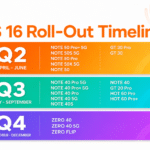
Tecno provides updates based on device launch year, hardware capability, and update policy. Below is an expected list, not official confirmation.
Important Note: This data is based on leaks and past update patterns. We update this list regularly. Please do not take this as guaranteed confirmation.
Tecno Camon Series (Expected)
- Tecno Camon 30 series
- Tecno Camon 40 series
Tecno Phantom Series (Expected)
- Tecno Phantom V Flip
- Tecno Phantom V Fold
- Tecno Phantom X series
Tecno Spark Series (Limited Support)
- Tecno Spark 20
- Tecno Spark 30
Tecno POVA Series
- Tecno POVA 5 series
- Tecno POVA 6 series
Tecno Pop & Budget Series
- Only selected newer models may receive limited updates
Update availability depends on region, hardware, and company policy. Older devices may not receive major updates.
Common Problems After Update and Easy Solutions
Some users may face small issues after updating. These problems usually affect only 3–6% users, so don’t panic.
Phone Feels Slow
- Restart your phone
- Close background apps
- Give the system 1–2 days to optimize
Battery Drain
- Allow time for system optimization
- Check battery usage in settings
- Avoid heavy apps for first 24 hours
App Crashes
- Clear app cache
- Reinstall problematic apps
Most issues fix themselves after normal usage.
Final Words
The HiOS 16 update for Tecno mobiles is designed to make phones smoother, safer, and easier to use. While not all features are available on every device, the update focuses on performance, battery life, and stability.
Always update your Tecno phone using the official system update method and avoid unofficial sources. This keeps your device secure and stable.
If you own a Tecno smartphone and receive the HiOS 16 update notification, follow the steps carefully and enjoy the improved experience on your device.







;;++74%+%74
I want Hios 16 update
plese tecno spark 40 pro plus me de